Edit Template

Integrate Razorpay Payments into WordPress (2026)

You can connect Razorpay to WordPress without writing API code using the official Razorpay plugin, especially if your website uses WooCommerce.

I’ll show you the dashboard steps, where to find your API keys, and how to test a payment before accepting real customer payments.

On Login to the Razorpay Dashboard

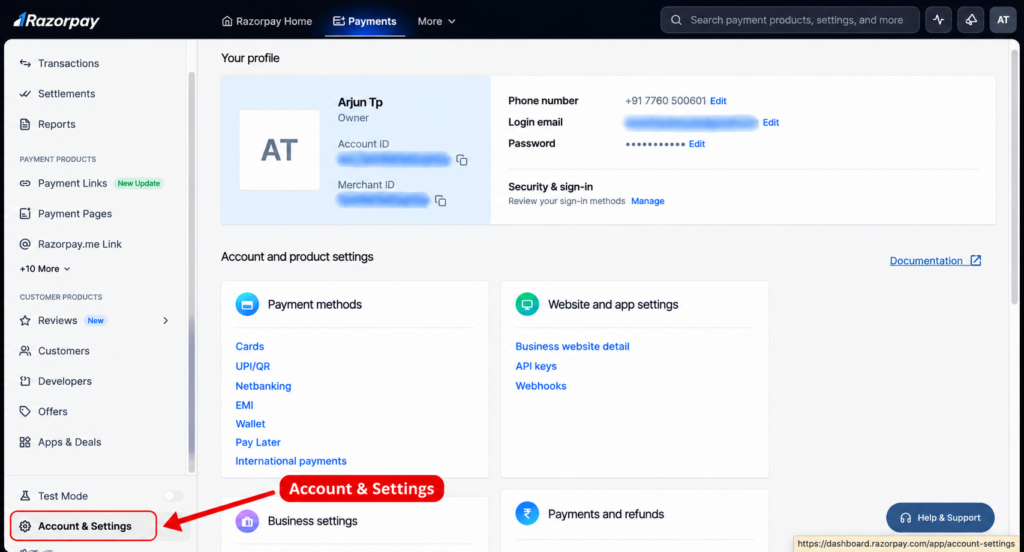
Step 1: Open Account & Settings.

1. Log in to Razorpay

Open Razorpay and sign in to your account.

Integrate Razorpay Payments into WordPress (2026)

2. Find Website and app settings → API Keys.

The dashboard may look slightly different depending on your account and interface version. Razorpay’s current documentation confirms this API-key path.

API Key generation

3. Copy the Keys and send

Never share your Key Secret publicly or paste it into a public page, chat, or frontend code.

API Key generation

Locations

United States

Canada

Australia

India

UAE

info@sociofrank.com

+1 657-880-0750

+91 77-605-00-601

Be Seen. Be Chosen

Sociofrank helps brands connect, stand out and grow through creative branding, engaging content, websites and digital marketing.

© 2026 All rights reserved with Sociofrank Media

Quick Chat 24/7
Scroll to Top